
777Pub Login Guide
777pub provides excellent support for players in the Philippines by allowing login using only a phone number and password. Choosing the phone number as the primary identifier to link one account to one player helps improve system management efficiency. Below, we will explore the steps to log in to 777pub and how the system processes your login request.
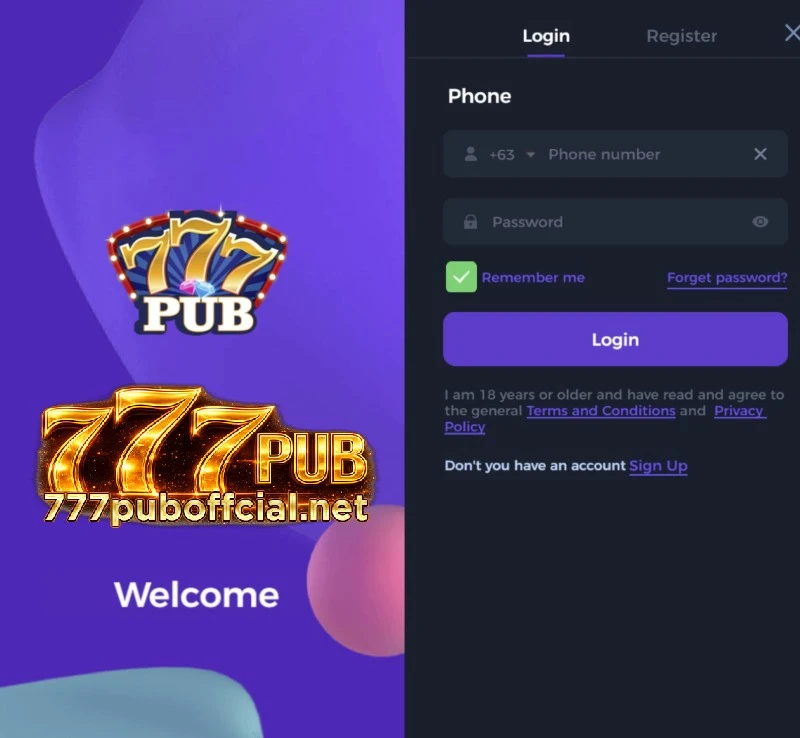
Steps to Login to 777pub Official
- Step 1: Open the official 777pub website or app
- Step 2: Enter your phone number with the +63 prefix (remove the leading 0)
- Step 3: Enter your password
- Step 4: Click Login
The login process is quite simple with only 4 steps. However, behind the Login button, a large amount of data is being processed. IP address, device fingerprint, login frequency, history… are all recorded by the system to ensure everything remains secure.
Understanding the 777pub Login Form
The official 777pub login form is simplified with only the most basic fields, including:
- Phone number (+63)
- Password
- Remember me
- Forgot password
- Switch to Register tab if you don’t have an account
777pub optimizes for players in the Philippines by only allowing phone numbers with the +63 prefix. As for the “Remember me” option, it helps you log in faster next time. You should not enable it if you are using someone else’s device or browser.
What to Do If You Forget Your 777pub Password?
Forgetting your password is common. Players can rest assured because the system links each account to an active phone number.
Steps to Recover Your Password:
- Click Forget password
- Enter your phone number
- Receive a verification code
- Create a new password
That is why registering with your own Philippine phone number is very important. Do not use random numbers or borrow someone else’s number, as it may cause many issues later.
Players should also note: never share your OTP with any third party.
Common 777pub Login Errors and How to Fix Them
- Incorrect phone number (usually missing a digit)
- Incorrect password (case-sensitive issues)
- Not receiving OTP (weak network)
- Account locked (too many failed login attempts)
Based on these common issues, we recommend logging in using a stable Wifi/4G/5G connection, turning off Caps Lock, and avoiding the use of IP-masking software (VPN).
In addition, players must ensure they do not log in through unknown links and never share OTP codes with any third party.
Login on Web vs App
Both app and web are recommended for logging into 777pub. Logging in on the web is more convenient, but the app is preferred by many long-term and loyal players.
Website: Quick login, no installation required, but depends on the browser and network connection, which may cause reloads or disconnections during gameplay.
App: Login on the app is usually faster, more stable, and requires less data loading during gameplay. The app also keeps your session active longer, so you don’t need to log in repeatedly.
Players should use both web and app versions depending on their device and internet speed. Some special promotions are only available on the official app.
FAQ
1. Do I need OTP for every login?
No. OTP only appears when logging in on a new device, changing IP, or logging in multiple times.
2. Can I use email instead of a phone number?
No. 777pub only supports phone numbers for registration and login. It does not support third-party login methods like Google or Facebook because they are harder to manage and less secure.
3. Can one account log in on multiple devices?
Yes, but the system may flag unusual activity and require sudden OTP verification.
4. Will my account be locked after multiple failed login attempts?
Yes. If you enter the wrong password too many times, your account may be temporarily locked. We recommend using the forgot password feature or contacting support to unlock your account.
5. Should I use the “Remember password” feature?
Yes, if you regularly log in on the same device, it can save a lot of time.